PIM without the pilgrimage
This is one of those minor frustrations that are actually quite annoying: You have access to several tenants and need to activate PIM roles. This means a pilgrimage through the Azure portal and switching between tenants and performing the activations. But it doesn't have to be like this.

As a long-time consultant, one of the pain points I've learned to live with is the need to PIM-hop: Logging on to one or more customer tenants to activate one or more roles to do my regular tasks. And to be honest, while I'm there I would activate other roles just in case because it is a pain to keep navigating through tenants and activations in the Azure portal.
The problem with friction is that people adapt to it.
If activating a role takes too much effort, it becomes tempting to activate more than you need, for longer than you need, simply to avoid going through the process again.
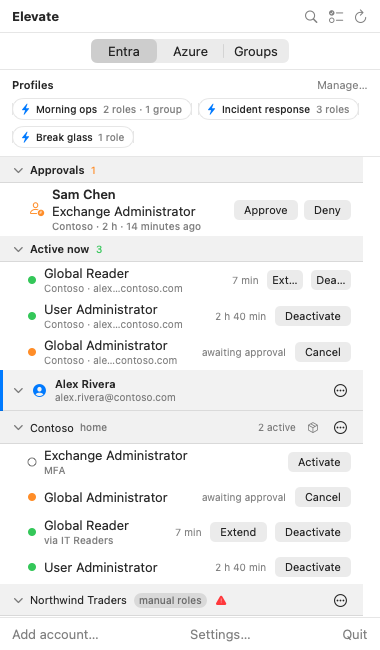
That frustration eventually became Elevate : An open-source desktop app and CLI that brings Entra ID and Azure PIM activation directly to your menu bar, system tray or terminal.
If activating exactly what you need takes a few seconds, there is much less reason to keep privileged access around "just in case."
Instead of jumping between tenants and portals, Elevate gives you one place to see and activate the roles you are eligible for — across multiple accounts and tenants.
The goal is simple: make just-in-time access easy enough that it can actually stay just-in-time.
What about permissions?
To do this, Elevate needs an Entra ID app registration with a set of delegated API permissions. These permissions allow Elevate to act on behalf of the signed-in user; they do not give the application independent access to your tenant.
Your existing PIM eligibility and tenant policies still apply, including MFA, approval requirements, justification and activation duration.
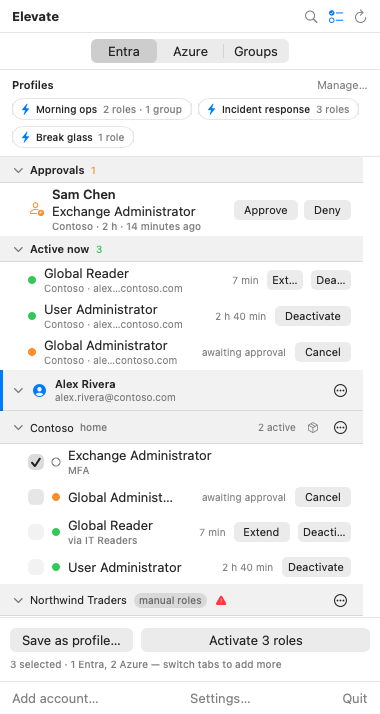
I need to activate more than one role often
Well, hello profiles - Elevate allows selecting roles across tenants and accounts and saving them as a profile which can then be activated as one action.
Access packages
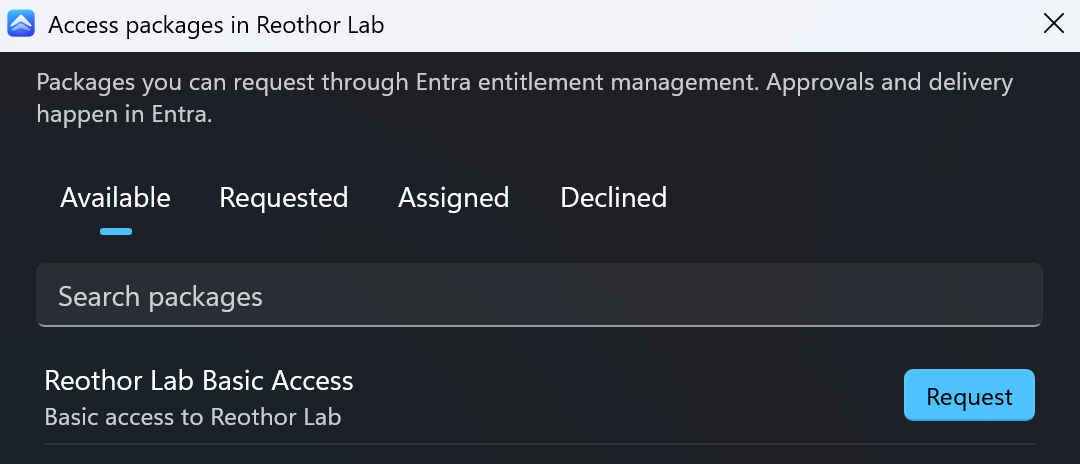
Of course, a lot of PIM roles come as part of an access package so why not also let Elevate give you the possibility to request those?
Anyway, Elevate has a bunch of features which I didn't really think was possible for such a simple thing as role activation. And I also had my AI research the PIM frustrations out there which helped a lot shaping this.
Also, this turned out to be useful for teams.
Elevate therefore includes enterprise deployment and configuration options, including managed tenant settings, centrally defined profiles and configuration through tools such as Intune, Jamf and Group Policy.
That means organizations can provide the same streamlined PIM experience while still controlling how Elevate is configured and used.
Just-in-time, as it was meant to be
Elevate is free and open source, with desktop apps for macOS and Windows, plus a CLI for Windows, macOS and Linux.
If PIM activation is something you do regularly, especially across multiple tenants, give it a try.
At the very least, I hope it makes privileged access slightly less annoying and just-in-time access a little more genuinely just-in-time.
Bonus: Elevate Audit
While building Elevate, I also ended up creating a small companion tool called Elevate Audit.
It is focused on reviewing PIM configuration and helping you understand how privileged access is currently set up in your environment.
It is separate from Elevate itself, but if you are already looking at how PIM is being used, it may be useful as well.